Orbit Slinger
Leaderboards
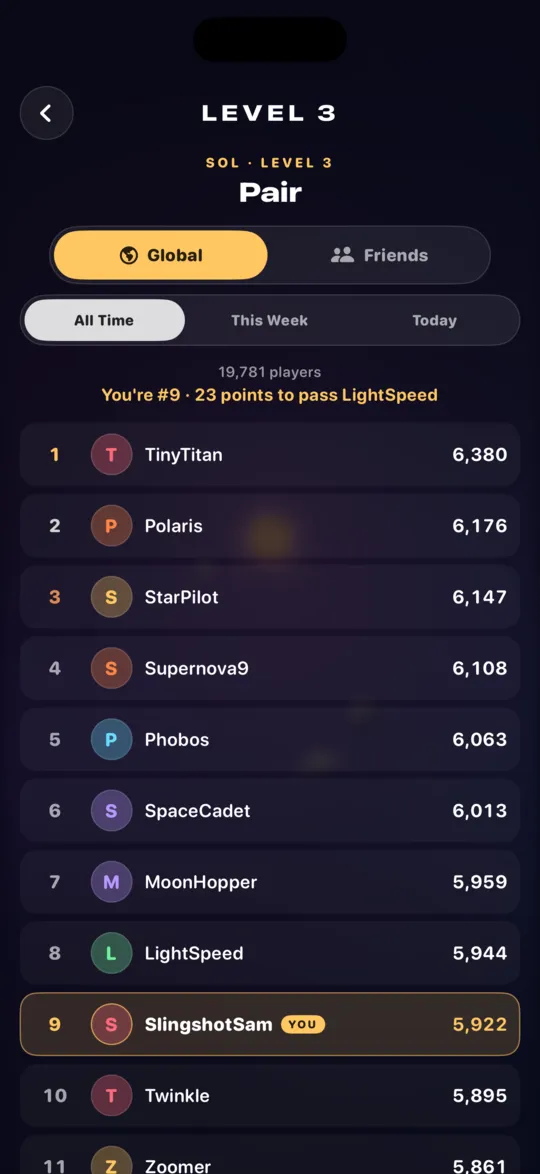
Orbit Slinger keeps score with Apple's Game Center, and since 2.3 the leaderboards are right in the game: the whole world or just your friends, all time, this week or today. Only slung planets score: Guided wins don't count.
Total score
Your best score on every level, added up. The overall ranking.
One per campaign
All seven star systems, from Sol to the Blue Giant, have a board for your total across their ten levels.
One per level
All seventy levels have their own board, so you can chase a friend's best on a single level.
Daily Challenge
A board that resets every day at midnight UTC, for that day's level. Kept separate from your total.
Open the leaderboards
- Sign in to Game Center. The game offers after you've finished level 4, or use the iPhone or iPad Settings app › Game Center.
- Tap Leaderboard on the main menu for every board: the total, each campaign, each level and the Daily Challenge.
- Or go straight to one: tap the trophy on the Daily Challenge card or beside a campaign, or press and hold any level on the level select screen.
- Switch between Global and Friends. A new best shows its place on the board straight away.
- You can also find Orbit Slinger's boards and achievements in Apple's Games app.
Game Center is optional. The game works fully without it, and your scores go to Apple only if you're signed in. There are 42 achievements to earn along the way, including Moon badges for Daily Challenge streaks.